Home / Moving from another tool
Moving from another tool
Most people put off switching because of the typing. You do not have to retype anyone. Export your list from wherever it lives now, as a spreadsheet or an Excel file, and Occanovo reads it. It takes a few minutes.
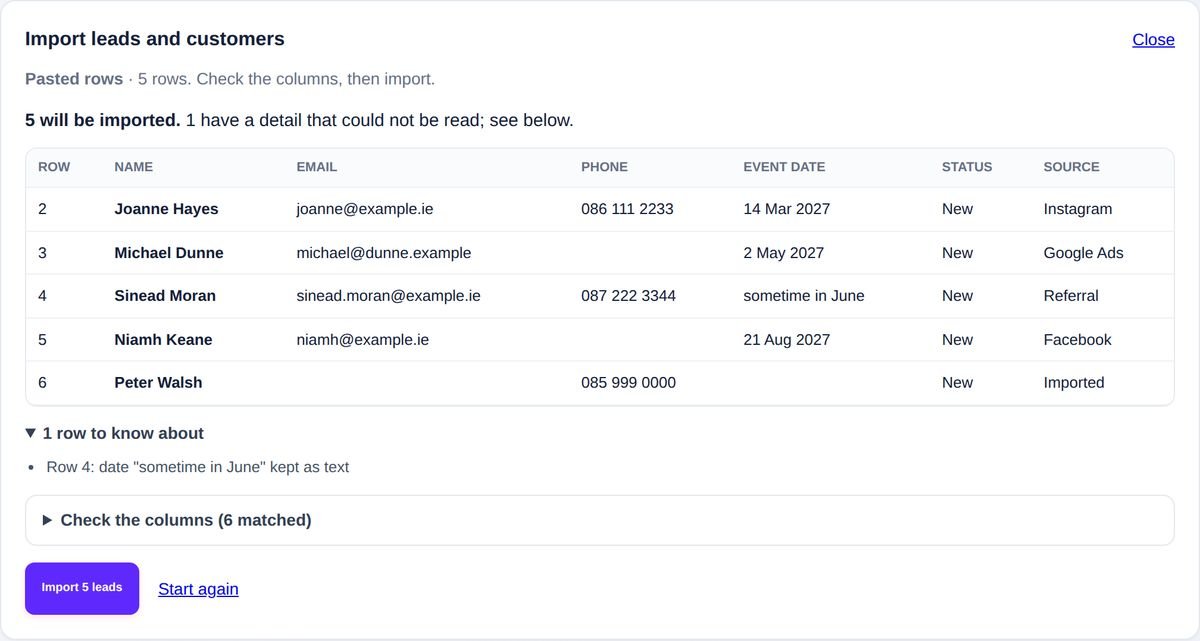
Upload an Excel or CSV file from your spreadsheet or your old booking tool, or copy the rows straight out of a spreadsheet and paste them in. Occanovo matches the columns from their headings, whatever the other tool calls them. When a heading is unusual, AI works out what it means from the heading and the shape of the values. It never sees your customers' names, emails or phone numbers.
Upcoming bookings come across as bookings: on your calendar, with the date, start and end time, the price and what the customer has already paid. Past jobs stay in your customer list with their history.
Before anything is added, it shows you what will happen to every row: who is new, who is already in your CRM, who appears twice, and any detail it could not read. Nothing is saved until you press Import.

No. Anyone with the same email or the same phone number as someone already in your CRM is left out, and so is anyone listed twice in the file.
No. Imported customers never get the instant reply or follow up reminders, and adding their bookings sends them nothing. They are marked as imported on their timeline.
Undo the import for seven days. It removes the bookings it added too. Anyone you have worked on since is kept.
Most tools have an export or download option in their settings or on their contacts list. Look for CSV or Excel. Both work.
Stuck? Press "ask us for help" on the import screen, or email hello@occanovo.com with the name of the tool, and we will tell you where the export button is.
The rest of the morning is setting up your packages and connecting Stripe, with step by step help beside each one.
No card to start. We help you bring your customers and bookings across, and in return we ask for your honest feedback. Your workspace is set up for your country and your kind of business as soon as you sign up.
May we use cookies to see which of our adverts bring people to Occanovo? Nothing is set unless you accept. Privacy
Hi. Ask anything about Occanovo: prices, what it does for your kind of business, or moving over from what you use now.